
#88: How to Vibe (Claude) Code Part II
Markdown files, skills, Git, and the importance of engineers

Recently, OpenAI launched GPT 5.5, their latest frontier model boasting major improvements in agentic coding. It’s interesting to see how much OpenAI’s narrative has changed over the past few months. At the start of the year, OpenAI had Sora (video generation) and Instant Checkout (commerce). Now, they’ve deprioritized both and claim to be “building the global infrastructure for agentic AI”.
Reading between the lines of the model announcement, OpenAI subtly jabbed Anthropic by citing GPT 5.5’s token efficiency for problem solving. For context, Anthropic has faced criticism for token limits and model outages.
When I see news like this, I’m tempted to abandon my current AI setup for the flashy new thing. In some cases, that’s a wise thing to do, particularly if the new model’s upgrades are relevant to your workflow. But I believe you can reasonably expect that every major AI company is going to come up with the latest and greatest every couple of months and frequently changing your AI operating system has material switching costs in time and productivity.
My advice? Pick a model ecosystem and commit to going deep. It matters less which model it is, and more that you are putting consistent effort into learning how to get the most out of it for your workflow. I’ve chosen Anthropic’s Claude models as my focal point, but there’s no harm in spending your time in OpenAI’s Codex (Claude Code rough equivalent).
Although I’m not too familiar with the inner workings and lingo of other agentic coding tools besides Claude Code, I imagine the following tips will be transferrable regardless of solution. Without further ado, let’s get into this week’s Claude Code learnings.
Building in Claude Code
Markdown Files
Candidly, I hadn’t heard of markdown files (.md files) before I downloaded Replit a while back. It looks kind of like a .txt file (i.e. the Notepad app on your computer). A key trait of AI-generated markdown files is that they contain a lot of hashtags, asterisks, backticks, and bold-font section titles.
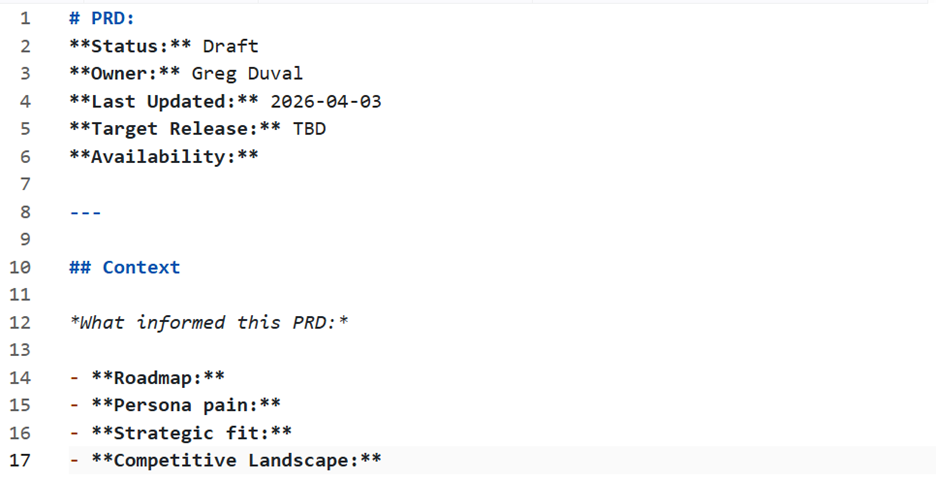
AI prefers markdown files because of its semantic structure. Hashtags signify hierarchy and structure, while backticks denote code. Since the communication method is clear, markdown files are relatively token efficient for AI models to ingest.
Although the formatting can take some time to get used to, writing instructions and context for agents are best handled in markdown files. I open an IDE (Visual Studio Code) and select a folder on my desktop. Then I’m able to see all the markdown files AI (or myself) has created, and either edit existing instructions or create new ones.
Markdown files look odd, but don’t be intimidated. They are essentially Microsoft Word docs for AI.
Claude Skills
Skills are clutch and are becoming an increasing part of my day-to-day. Oversimplifying it, the difference between skills and agents is that skills operate as singular tasks where context is defined ahead of time. On the other hand, agents handle more complex, sequential workflows and can maintain context across tasks. Agents can complete skills, but a skill is not an agent.
Recently, I developed a skill that transforms video transcriptions into YouTube-optimized titles, descriptions, and tags. I fed Claude Code all the information needed to complete this recurring task and now it executes the task whenever I type “/skill youtube-automation” and provide a bit of context.
You can create skills to consolidate notes, provide weekly recaps on meetings, and complete performance analysis.
How to get started? Ask Claude to help you create a skill. Make sure you’re on “plan mode” so Claude can run you through a Q&A on what you’re looking to build. Claude will proceed to generate a markdown file with your necessary information, goals, and steps to take.
Oh, and check your settings section of the Claude desktop app. There are tons of built-in skills that Claude offers today, that you can call directly from the desktop or terminal.
Pushing to Production
GitHub 101
You are happy with what you built and you want to “save it”. If your usual workflow consists of Microsoft Excel, Word, and PowerPoint, you’re going to need to rethink what saving here means. But that doesn’t mean it is harder to do.
GitHub is a platform that stores and tracks changes to your code over time. It’s the standard way developers manage, back up, and collaborate on software. With integrations across most development tools and AI workflows, engineers and vibe coders can upload their code to GitHub relatively quickly.
You commit your code (save a version locally) and push it (upload to GitHub). If collaborating, you open a pull request (PR) to propose changes to the codebase for your colleagues to review.
First, make an account on their website and then ask Claude to help you connect your local project to a GitHub repository and walk you through the setup. There’s a bit of a learning curve once you’re on GitHub and you look through different branches and navigate the codebase, but rest assured, your code is saved in a secure spot.
The Importance of Engineers in the AI Era
There are plenty of headlines about how AI is eating up the software engineer job market. While there are layoffs in pockets at big companies, the broader story shows that engineering job postings are stabilizing in some areas or even rising (as per Lenny’s Newsletter).
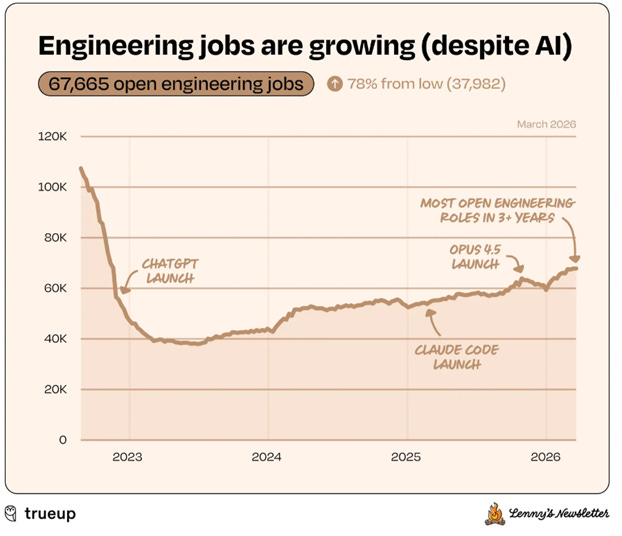
As a vibe coder, I’ve gained a strong appreciation for the value formal engineers bring to building software in the AI era. Vibe coding is excellent for spinning up a wireframe or a working prototype, however, if you plan to store user information or launch the product on the web for others to use, I highly recommend you have a well-trained engineer take a look.
Cybersecurity and scalability are two major concerns when deploying software. Even with repeated prompting around closing any vulnerabilities, there are still holes. Hackers can not only find a way to extract private user information, but they can also find ways to take advantage of features on your app or website.
What do I mean here? If your product involves an API call to an LLM to retrieve data, a hacker could exploit the API integration to run their own API calls and stiff you with the bill. Next thing you know, you have a $10K charge overnight because someone else found a way to run up your tab.
If you plan on accepting and storing payment information or user identification information, reach out to an engineer to take a peek at your codebase. Engineers aren’t going away any time soon; it’s more of a flight to quality. The best ones are in more demand than ever.
If you’re just starting out and have questions about getting started with Claude Code, I’d be happy to troubleshoot and share some pointers. Subscribe and reply to this email with your question!